| CompSci 190 Fall 2022 |
Programming Games FOCUS Section |
Final Project
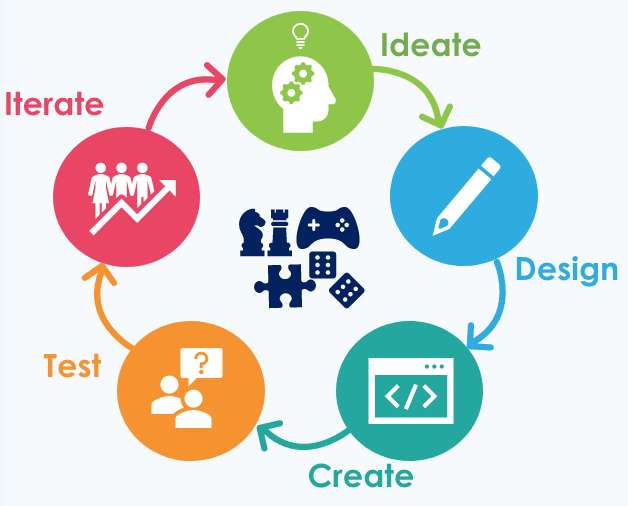
Design and implement a complete game of your own design in Python program using the Arcade module. If you choose to start from an existing game, you must add something to the gameplay that makes your game unique. In either case, you should playtest your game with other students and be able to describe what principles your game has that will make it fun to play.
Your game should be more complex than, and distinct from, the games you have done so far, but not so complex that you cannot complete it by the end of the semester. Complexity can come from the number and variety of the levels in the game, from the gameplay itself, or from the generality of your program.
This can either be a lot of fun or very frustrating depending on how well you plan your project. For this reason, it is even more important that you think about your program carefully before you start coding, especially what classes you will make. It is also vital to build your program incrementally in small, manageable steps that keep things simple and focus on a Minimum Viable Product (MVP). For example, start by implementing your game's primary interactions (especially before adding levels, fancy graphics, or sounds) such as in this time-lapse video of making the game MetaGun as part of a Game Jam competition.
Whether the gameplay is simple or complex, aim for something you would be excited to show to your friends because they would think it is fun to play rather than something that looks flashy or is ready to deliver to an App Store.
If you having trouble thinking of your own game to create, consider doing a variation of Breakout that fulfills the specifications below.
Specifications
Complete these minimal requirements:
- at least three levels, each of which increase in difficulty in some way
- a collection of objects to interact with rather than a fixed number
- clearly display the player's status in the game (score, lives, level, time remaining, etc. as appropriate)
- ending conditions for the game, after which is displayed separate winning and losing messages
- keep track of the top scores in a file and display the maximum score ever on the screen (which might be the lowest value)
- allow the user to restart the game by resetting all the game objects, scores, and options to their starting values
- a theme or "back story" based on its images, backgrounds, and information you provide via splash screens read from a file rather than written directly in the code
Beyond the basics, you must add at least one feature to make your game more fun to play, such as:
- reactions: give the player or other game objects a reaction to being hit (e.g., changing color, explosions, spinning wildly, etc.)
- waves: create moving objects in different patterns (using different files for each wave or level)
- physics: use the Pymunk physics engine, integrated with Arcade, to make your collisions physically realistic
- AI: smart enemies to oppose the player (note, it may be difficult to make something appear "smart" but also be beatable)
To accompany your game, provide the following materials:
- advertisement: as you might find on the app store or, originally, the cover of the shrink wrapped box your software came in
- iteration journal: show plans or screen shots from at least three different points in your game's development with notes about your goals, at least two playtester's feedback, and your response for how to improve the game
- video: record a 1-2 minute video of someone else playing the game with voice over describing their feedback as they play the game (what they like or don't like about the game)
- README file:
- acknowledgments for any online or human resources used
- acknowledgments for any resource files (images, sounds, etc.) used, all of which must be royalty free and not "stolen" off of the web
- how to interact with the game, how to win or lose the game, and how the levels increase the challenge of the game
- explanation about the design choices you made to make your game fun to play
- explanation of why you believe it to meet the complexity and distinctiveness requirements
- what you learned from the process of creating your game
- video: record a 1-2 minute video of you playing the game with voice over describing what is happening in the code or design choices you made
You will regularly demo your progress to the class to get feedback.
Resources
- Basic Principles of Game Design Video by Brackeys
- The Structure of Games by T. Fullerton from Game Design Workshop
- What Players Want from Game Design: Theory & Practice by Richard Rouse III
- I Have No Words and I Must Design by G. Costikyan

|
Last modified 06 Dec 2022 |

|