Turtle Art
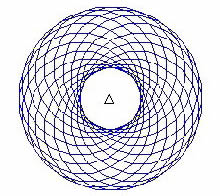 Logo is a computer programming language designed to teach programming to children. It is a user-friendly, interpreted language, designed with a "low floor, high ceiling"; in other words, the designers of Logo intended for the language to allow novice programmers to get started quickly writing programs but also wanted the language to be powerful and extensive for more advanced users. In the last 40 years, Logo has also caused people to think differently about how to teach geometry, social science, and complex systems.
In the early days, Logo was used to control a simple physical robot, called a turtle. Users could issue commands such as FORWARD 50 to make the turtle advance 50 steps, or RIGHT 90 to make it turn ninety degrees. The turtle robot carried a pen, so users could produce drawings on paper, such as the one shown to the left, by controlling the turtle and its pen. The turtle, which has since moved on to the computer screen, has become one of the most familiar and important parts of the Logo language — for the complete history see here.
These turtle commands are so much a part of programming history that they have been incorporated into almost every modern programming language, Python included. We will use this simple system to explore the basics of programming. Examples of using the turtle are given in the course textbook and you can use any of the active Code boxes in the text book to complete this part if you do not have Eclipse installed properly.
Write a Python program that draws any picture you want using Python's Turtle Graphics module discussed in class.
If you have already installed Eclipse, then that is the preferred software for you to use to complete this exercise. Note, in Eclipse you will need to add the following line as the last one in your program:
# assuming you are using the name of the Screen from the book
wn.exitonclick()

