preparing the environment
Before you can
use the Duke Ambient environment to start working on your projects or
labs, you need to make sure that all configuration settings suit your
needs. If you do not verify the preference settings, it is probable
that Ambient will not function correctly.
verifying the preference setting
- Open the
Ambient preferences by selecting Window
> Preferences > Duke Ambient >
Checkout/Checkin. You should now see the following window.
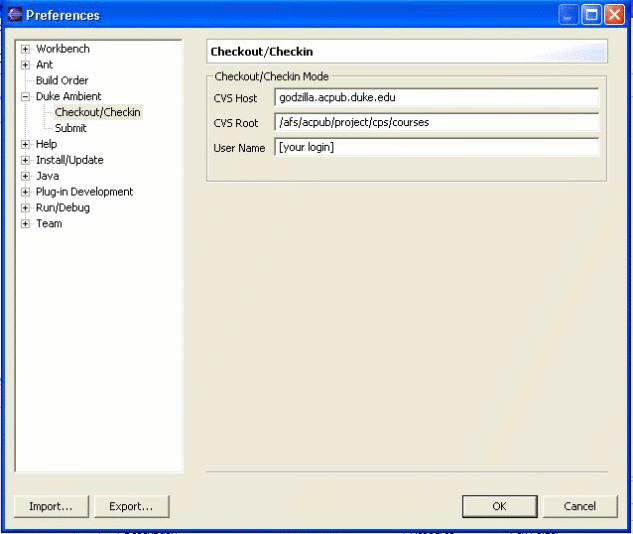
- The CVS Host should be [any acpub computer].acpub.duke.edu
(ie. teer27.acpub.duke.edu) and the CVS
Root should be /afs/acpub/project/cps/courses. Lastly, you need to replace [your login] with your NetID.
- Next,
change the Submit preferences by selecting Window > Preferences > Duke Ambient
>
Submit. You should now see the following window.
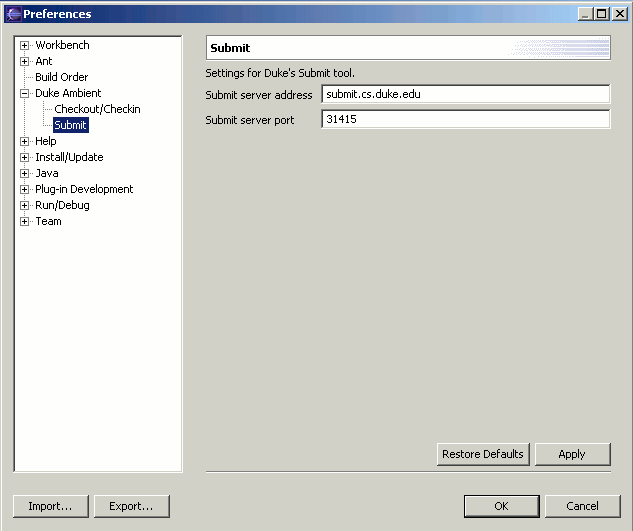
- The Submit server address should be submit.cs.duke.edu and the Submit server port should be 31415 (these are the default
preferences).
- Click
OK to save the preference settings.
This will close the window. You are now ready to check out your first
project.
|