info
The Ambient toolbar is easy to use:
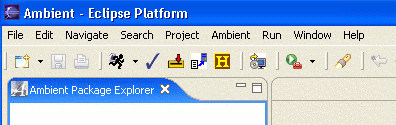
It contains several buttons needed for handling programming projects:
-
Run and Debug options
-
Checkout and Checkin Project
-
Recovery of a previous checkin
-
Submit and Submit History Tools
-
Browse Sites Tools (Snarf)
student documentation
Choose from the topics below or download the pdf
file.
professor documentation
A directory structure needs to be set up for optimal use of all Ambient/PROF
features. Information on how to set up course, projects, groups and student
directories can be downloaded as a pdf file.
The scripts are available through CVS at /afs/acpub/project/cps/eclipse/cvs as
ScriptsProject.
You can browse information on how to:
or download the pdf file.
apt documentation
Read the documentation available on using the
APT engine.
server documentation
If you need information on running a course server, take a look at the
documentation available.
|